In the previous post in this series, I described how we migrated existing page elements from Panels to Layout Builder.
Pages on this site are assembled from configurable page elements implemented as block plugins. These elements display data managed by an external system. Drupal stores their arrangement and configuration, but not the underlying data.
The Drupal 7 site already had a system for creating new pages from templates. It also supported importing, exporting and cloning individual page elements. The question for the rebuild was not whether we needed page templates. It was how to represent and edit them in Layout Builder without keeping a separate administrative interface.
Page templates in Drupal 7
The Drupal 7 implementation stored templates in two custom database tables. One contained the template name and the content type for which it was available. The other contained its ordered page elements, including the ctools plugin ID and serialized configuration.
Creating and maintaining templates was restricted to administrators. The management screen was a sortable table containing the internal name, plugin type, settings, configuration, weight and operations for every element.
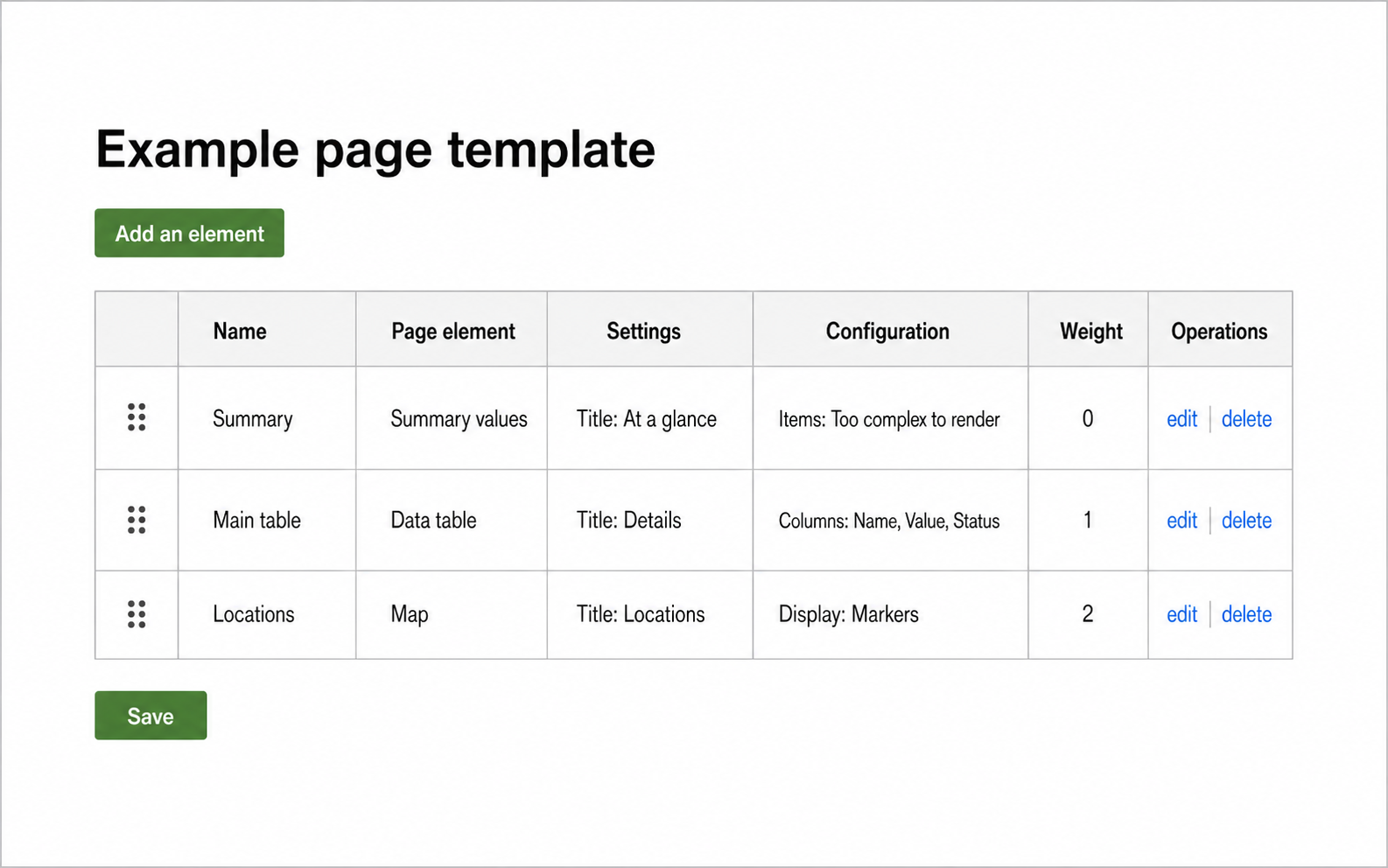
The Drupal 7 template editor represented page elements as sortable rows of settings. It provided no preview of the resulting page.
Adding an element opened another administration form. An administrator selected a plugin, entered an internal name and filled in the settings that the plugin exposed for use in templates. Some settings were easy to show in the table. Nested configuration was not. In those cases, the interface sometimes displayed “Too complex to render” instead of a useful summary.
Normal page editors did not work in this interface. With a separate permission, they could apply an existing template through Panels IPE. This replaced the elements in the main content region with those from the template. A ctools plugin could provide a callback when parts of its configuration had to be adapted to the destination page.
This allowed templates to be reused, but creating them remained an administrative task. Administrators assembled an abstract list of plugin configurations and had to apply it to a page before seeing the complete result. Page editors could use the finished templates, but they could not turn the page they were working on into a new template.
Creating templates from working pages
In the rebuilt site, a page template is a custom content entity. Like a regular page, it stores Layout Builder sections and components.
The rebuilt system also separates template administration from everyday use. The full template catalogue remains restricted, while creating and applying templates have their own permissions. Normal page editors can therefore use these operations without receiving access to template administration.
To make the actions easy to reach, we added them to the frontend controls provided by Layout Builder IPE. Editors can apply a template or save the current page as one from the same action bar that gives them access to Layout Builder.
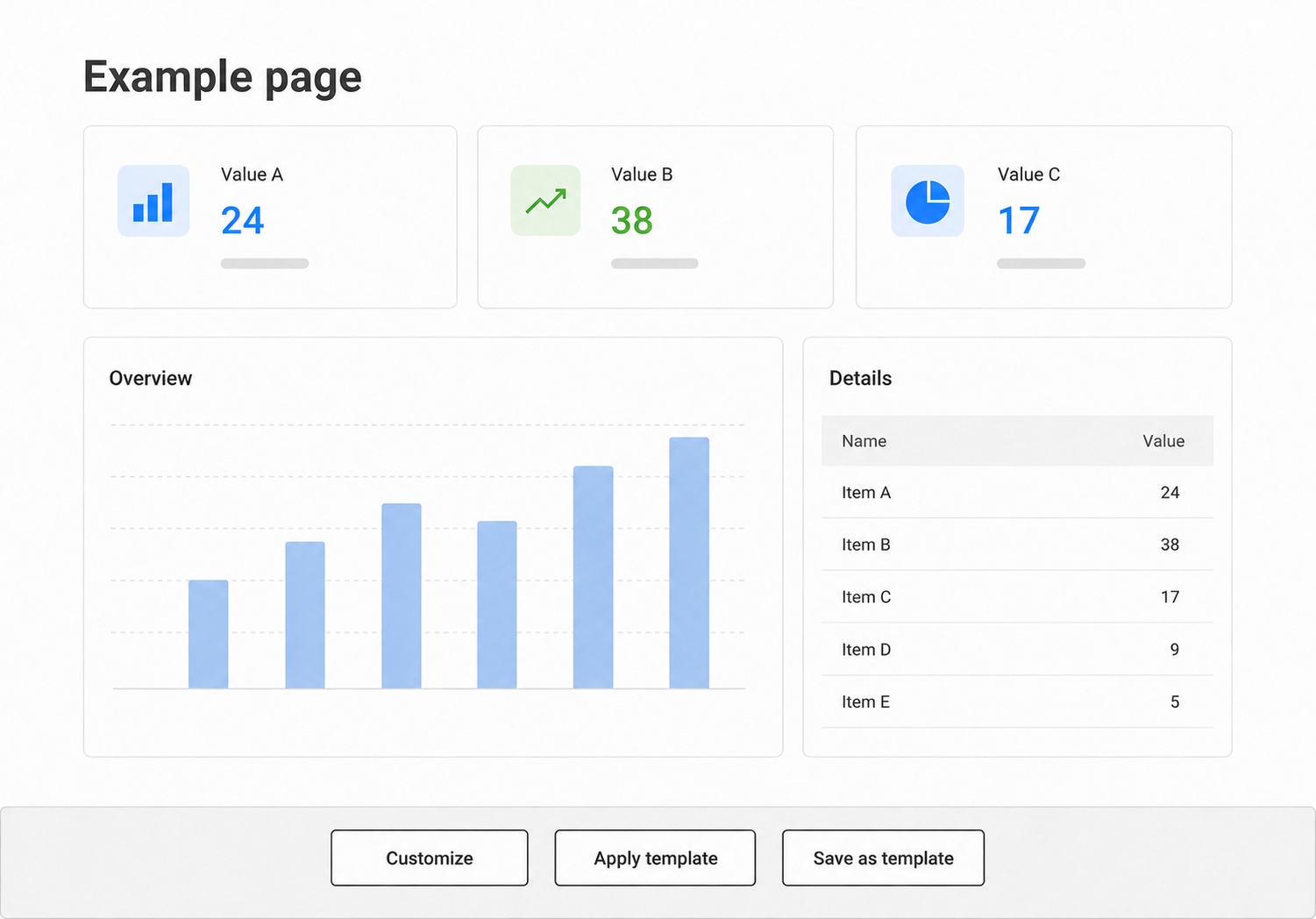
A simplified view of the frontend controls. The template actions are available directly from the page alongside the normal Customize action.
The main workflow starts with an existing page. Once its elements have been configured and arranged, an editor can save that page as a template.
This matters for data-driven page elements. Their configuration forms often depend on the data objects available on the current page. The properties and relationships described by those objects determine which options the editor can select.
Starting with a working page provides representative data while the arrangement is being prepared. The editor can configure the elements, check the complete result and then store the layout as a template.
The new template is independent of the source page. Administrators can maintain it through the template catalogue and edit its layout using Layout Builder. Page editors can apply it to other pages of the same content type.
Reusing the import process
Import and export were not new features either. The Drupal 7 site already allowed individual page elements to be exported, validated, previewed and imported into another Panels region. Several ctools plugins also provided specific handling for exporting or cloning their configuration.
We rebuilt this capability early in the Layout Builder implementation. The current version can export the block plugin ID and its configuration as YAML. Importing it creates a new Layout Builder SectionComponent.
Copying a component involves more than copying its configuration array. Every component needs its own UUID. It may also contain context mappings that connect its block to the current page and the data objects available there.
Those mappings cannot be copied unchanged. Otherwise, the imported component could remain connected to objects from the source page. The export therefore leaves them out, and the importer creates new mappings for the destination. Block plugins can also prepare their configuration before export, adjust it after import and validate whether it can be used on the destination page.
After individual elements, we added the same process for complete Layout Builder pages. A page export contains its sections, components and editor-managed configuration, but excludes component UUIDs and source-specific context mappings.
By the time we needed a managed template system, we already had code for copying sections and components safely from one Layout Builder-enabled entity to another. Templates did not need a separate storage format: their configuration is stored normally in Layout Builder sections and components. Applying a template reuses the existing copying process to transfer those components to the destination page.
Configuration depends on the destination data
Copying the Layout Builder configuration is only part of the process. The imported page elements must also work with the data available on the destination page.
The external system provides both the data and a machine-readable description of its structure through the same API. This schema describes the available types of data objects, their properties and the relationships between them.
Page-element configuration depends on that schema. Drupal uses it to determine which options can be offered in configuration forms, how they should be labelled and what kind of values they represent. Without it, Drupal would need to maintain a second description of the external data or expose identifiers that editors could not interpret.
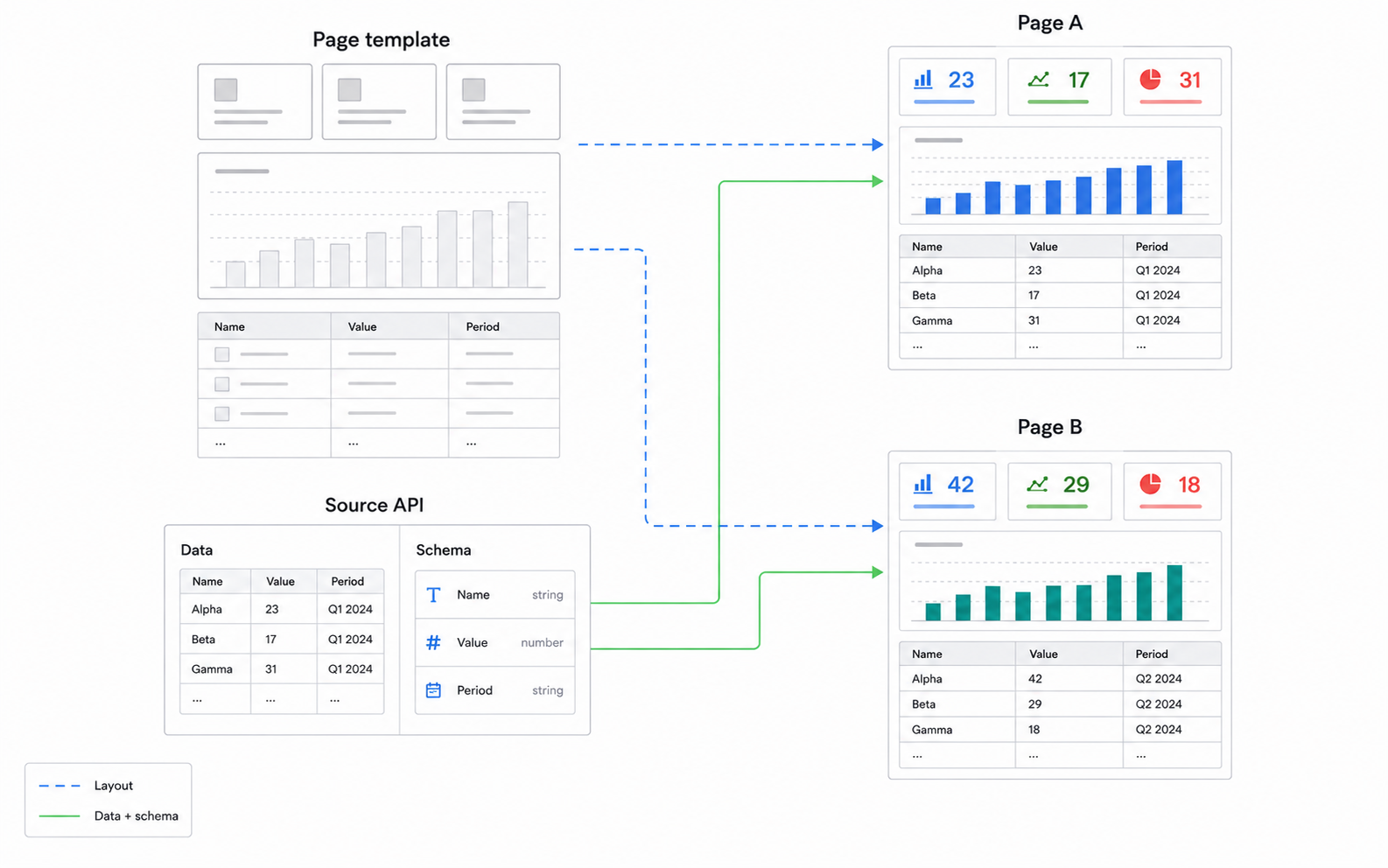
The template supplies the layout. The external system supplies data and its schema directly to each page.
The schema is also a prerequisite for applying a template. An element may have been configured using properties available on the source page. The importer needs the schema of the destination page to check whether the required structure is available there.
Each imported block is connected to the destination page and its data objects. The block plugin can then adjust and validate its configuration against the schema available there.
The template contains the presentation, not the data. After it has been applied, its page elements retrieve information through the data objects belonging to the destination page.
Applying a template
After selecting a template, the editor sees a preview of its page elements. All elements can be imported, or only a selection. They can replace the current layout or be added to it.
The result remains in Layout Builder’s temporary storage, so the editor can inspect and change it before saving the page. Applying a template creates an independent copy: the page does not retain a relationship to the template and is not changed when the template is edited later.
The main purpose is to make it faster to create pages that follow a consistent structure. A template provides defaults that have already been assembled and checked, but it does not lock the page to them. Editors can adapt individual elements or depart from the default arrangement when needed.
Why not use a default layout?
If every page of a content type used the same presentation, a default Layout Builder layout would be sufficient.
Our content types provide a broader classification. Pages of the same type can still differ in the data structures available to them, the labels they use and the information they are intended to emphasise. We therefore allow more than one template for a content type. Each represents an arrangement that has already been configured and checked against representative data.
Restricting templates to the same content type prevents obvious mismatches. Content types can have different fields, default layouts and restrictions on the blocks that may be placed.
It is still only a broad compatibility check. Two pages of the same content type can use different external schemas. For now, the template name, its source description and the element preview help editors choose a suitable one.
A more precise implementation could record the schema requirements of a template and filter the available templates accordingly. We have not added that layer so far.
What changed in the rebuild
Page templates and configuration import were not new requirements. The Drupal 7 site already provided them.
The main change was how templates were represented and who could create them. The old system stored templates in custom tables. Administrators maintained them through a text-based interface, while page editors could only apply the finished templates.
The rebuilt system stores templates as content entities with Layout Builder sections and block components. Page editors can turn a working page into a template and apply one through the frontend controls they already use to start editing pages.
Moving configuration still requires handling component identity, page context and differences in the external schema. Layout Builder does not remove those concerns. It does give templates and regular pages the same underlying structure, which made the editor-facing workflow possible.
Templates cover arrangements that editors can prepare and reuse. They are less suitable when the page hierarchy or the number of page elements must be derived from the data itself. That is a separate part of the rebuild and probably the subject of the next post.