In the previous post in this series, I described how we rebuilt our ctools page elements as block plugins.
That gave us the new implementations, but not the pages that had already been assembled in Drupal 7. Recreating them manually would have taken a long time and risked losing existing configuration along the way.
We did not want to migrate complete Panels displays. The rebuilt site had its own Layout Builder sections and layouts. We wanted to preserve the page elements, their order and as much of their configuration as the new block plugins could still use.
For this, we built a temporary module. We called it element sync because it could run repeatedly while both sites were available.
Exporting the Drupal 7 elements
The Drupal 7 site provided a JSON endpoint that exported the page elements of a single page.
Each page represented one or more data objects. Both sites knew the original IDs of these objects because the data came from the same external sources. The new site could therefore request the old configuration without matching Drupal node IDs.
The endpoint loaded the corresponding Drupal 7 node and its Panelizer display. It went through the panes in the relevant content regions, in their stored order, and returned the custom page elements it recognized.
A simplified response looked like this:
{
  "status": true,
  "elements": [
    {
      "type": "page_element_type",
      "configuration": {},
      "uuid": "source-pane-uuid"
    }
  ]
}
For each element, the response contained its ctools plugin type, stored configuration and pane UUID.
The endpoint ignored panes outside our page-element library and panes from unrelated Panels regions. The new site had its own layout structure, so there was no reason to reproduce the complete display.
Most configuration could be returned as stored. A ctools plugin could also provide an export callback if its configuration needed some preparation first.
The endpoint exposed only element configuration, not page content or sensitive data. Even so, as part of our general infrastructure hardening, it could only be accessed from our own servers.
The destination changed during development
The first version of the synchronization did not create Layout Builder components. We were still evaluating Paragraphs at that point, so the proof of concept created Paragraph entities and attached them to the page.
When we settled on Layout Builder, the destination changed to block plugins and SectionComponent objects. The Drupal 7 endpoint could continue returning the same description of its page elements.
The conversion on the new site changed, but the source did not have to know whether an exported element would become a Paragraph, a block or something else.
Letting blocks translate their configuration
The new site looked for a block plugin corresponding to each exported ctools plugin.
Where possible, we retained the old plugin ID. A block could also list additional source types when several Drupal 7 elements had been replaced by one new block.
Only blocks implementing a small interface could participate:
interface SyncableBlockInterface {

  public static function mapConfig(
    $config,
    NodeInterface $node,
    $element_type,
    $dry_run = FALSE,
  );

}
The mapConfig() method received the Drupal 7 configuration and returned configuration for the new block.
This kept element-specific conversion code out of the synchronization service. That service found the source element, selected a target block and created the component. The block handled the configuration structure it understood.
Some mappings only copied or renamed a few values. Others had to convert nested configuration.
One example was the block containing a configurable list of summary values. In Drupal 7, the items in that list were identified by old element types. In the rebuilt site, they were configuration-container item plugins.
The block used a transition map to connect the old item types to the new plugins. The names in this shortened example have been replaced with generic ones:
$transition_map = [
  'old_counter' => [
    'target' => 'counter',
    'config' => [
      'counter_type' => 'items',
    ],
  ],
  'old_value' => [
    'target' => 'value',
  ],
];
For each incoming item, the mapping selected the new plugin, copied its label and converted the relevant settings. Some settings could be copied directly. Others had changed shape and needed individual handling.
An item without a known mapping was skipped. If the block could not produce valid configuration, it reported the source element as incomplete instead of creating a broken component.
Preserving order and identity
After mapping an element, the synchronization service created a Layout Builder SectionComponent. It appended the components to the content region in the order supplied by Drupal 7.
Each component received a new local UUID. The UUID of the Drupal 7 pane was stored separately:
$config = [
  'id' => $definition['id'],
  'context_mapping' => [
    'node' => 'layout_builder.entity',
  ],
  'sync' => [
    'source_uuid' => $element->uuid,
  ],
] + $mapped_config;
On subsequent runs, the service searched for a component with the same source UUID. If it found one, it updated that component instead of adding another.
Components created locally had no source UUID and were left untouched. An explicit cleanup option was available when a page needed to be rebuilt completely from the source.
The context mappings were created on the new site. They connected the block to the current page and its available data objects according to the context definitions of the block plugin. We did not try to translate the old ctools context configuration literally.
After saving the sections, the service cleared Layout Builder’s temporary storage for the page. Without this, a layout opened before the synchronization could still contain an outdated temporary version.
It could also create a new revision with a message identifying the source site.
Inspecting elements before synchronization
Before synchronizing a page, we wanted to see which elements could actually be converted.
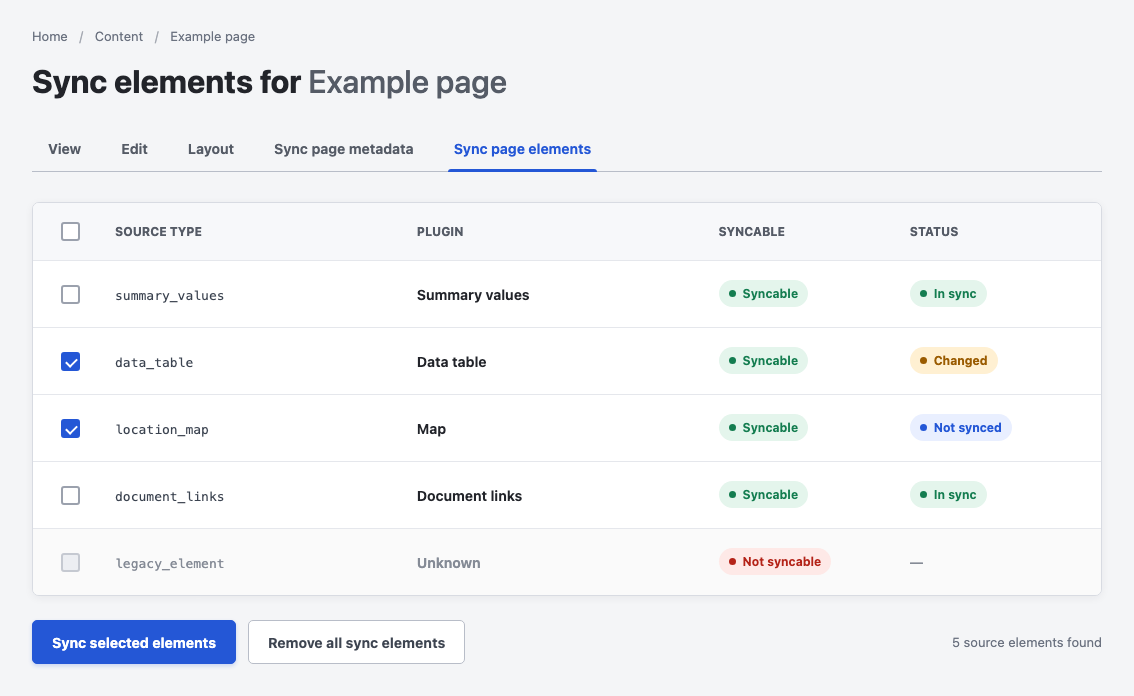
The synchronization screen showed which elements could be converted and allowed us to select them individually.
The page-level interface showed the source plugin, the corresponding block plugin and whether its configuration was valid. It also compared the source UUID and configuration with existing components and reported whether an element was missing, already synchronized or different.
For this check, the interface called mapConfig() with $dry_run enabled. The block could validate and map the source configuration without performing a synchronization.
We could select individual elements and synchronize only those. Unsupported or incomplete elements were disabled rather than causing the complete page to fail.
A separate batch form processed larger groups of pages. It could limit the operation by page type or ID, create revisions and optionally remove existing components before rebuilding a page.
We started with individual pages while block plugins and mappings were still being added. Larger batches followed once more element types were supported.
Removing the synchronization module
The synchronization module later picked up support for a few additional page settings, but it remained tied to the period in which both sites were running.
Once the Drupal 7 installation was no longer needed as a configuration source, the module had no remaining purpose. We removed it in 2023 while preparing the site for Drupal 10.