In the previous post, I described why we chose Layout Builder and how Layout Builder IPE restored the frontend editing workflow we had used with Panels IPE.
With the editing workflow in place, we still had to rebuild the elements that editors placed on their pages.
The Drupal 7 site used custom ctools content type plugins for maps, charts, figures, lists and tables. Editors placed and configured these plugins, while the plugins retrieved the information and rendered the result. I will call both these ctools plugins and the block plugins that replaced them page elements.
This part of the old architecture had worked well and there was no reason to change that approach.
From ctools plugins to block plugins
In Drupal 7, Panels stored the page layout and ctools plugins provided the page elements. A plugin defined its configuration form, declared the context it needed and provided the callback that rendered its output.
Custom block plugins were the obvious equivalent for the rebuilt site. Layout Builder stores their placement and configuration, while the block plugin builds the element.
Placing the old functionality in block plugins was relatively straightforward. The more interesting question was how a reusable block would know which data objects belonged to the current page.
A page element can appear on many pages, so it cannot contain a fixed data object ID. Instead, the page provides one or more data objects, and the element starts from these objects when retrieving information.
The Drupal 7 version did this through ctools contexts. A plugin normally requested a node context, and shared helper functions used it to find the page and its related data objects.
Block plugins can declare these requirements more precisely. A block can ask for the page entity, a particular type of data object or an optional related data object. Our shared block base resolves these contexts and passes them to the block. The rule is the same as before, but the required data objects are now part of the block definition.
Receiving the correct data objects does not remove the need for access checks. Some of our maps load their data through a separate request after the page has been rendered. Before returning that information, the controller checks whether the current user may access the page. The old site also performed access checks, but the new implementation gives us one place for this particular check and a test that covers it.
Getting the right data objects into a block was only one part of the design. We also had to decide how broadly each block should be configurable.
Why we kept separate page elements
Pages were intended to be assembled from reusable elements. The same element can appear on many pages, but its purpose and the data objects it expects should remain recognizable.
We knew this before we started implementing the rebuilt site. It was a product requirement rather than a consequence of using block plugins.
Tables are a good example. A table needs rows and columns. Its configuration mainly determines which columns should be shown. The rows come from the block, starting with the data objects associated with the page and following the relationships relevant to that table.
Each table block has code that assembles its rows and defines the columns that can be selected for those rows. Shared code handles the configuration form and renders the resulting table.
We considered the table types separate page elements even though they use the same underlying table code. Combining them into one configurable table would expose columns and behaviour from otherwise unrelated tables. Editors could then create many small variations, making it harder to keep the tables consistent and recognizable across the site.
Editors can reuse the same block on many pages. Its structure remains consistent, while its rows change according to the data objects available on the page.
Keeping the page elements focused did not mean limiting them to a few fixed settings. Several still needed editors to compose an ordered list of columns, values or sidebar items. This was another problem that the Drupal 7 implementation had already solved.
The configuration container
The Drupal 7 site used a custom Form API element called configuration_container for these ordered lists. It provided the common operations for adding, editing, removing and rearranging items inside a larger configuration form.
Each ctools plugin supplied an array describing the item types allowed in its configuration container. Simplified from one of the original definitions, it looked like this:
'item_name' => array(
  'title' => t('Item name'),
  'type' => 'configurable_item',
  'callback' => 'module_get_item',
  'availability_callback' => 'module_item_is_available',
  'conf' => array(
    'form_elements' => array(
      // Additional configuration fields.
    ),
  ),
),
The definition could contain configuration fields, context restrictions, availability callbacks and a callback for rendering the item. The configuration container used this information to build the form and manage the configured items.
We kept the container because its interface had already proved useful and editors knew how to work with it. The rebuild changed how its item types were implemented, not the editing workflow itself.
Instead of arrays containing properties and callback names, the item types are now Drupal plugins:
#[ConfigurationContainerItem(
  id: 'item_name',
  label: new TranslatableMarkup('Item name'),
)]
class ItemName extends ConfigurationContainerItemPluginBase {

  public function buildForm($element, FormStateInterface $form_state) {
    // Add the fields needed to configure this item.
  }

  public function getRenderArray() {
    // Build the rendered item.
  }

}
The example only shows the relevant parts. As you can see, the configuration form and rendering logic now belong to a class instead of being referenced by name from an array.
All item plugins implement the same interface. A plugin manager finds the available item types, and the configuration container creates the ones it needs. The plugins can also receive services through dependency injection.
The container still handles the common interface: listing items, opening their forms, storing the submitted configuration, changing their order and building previews.
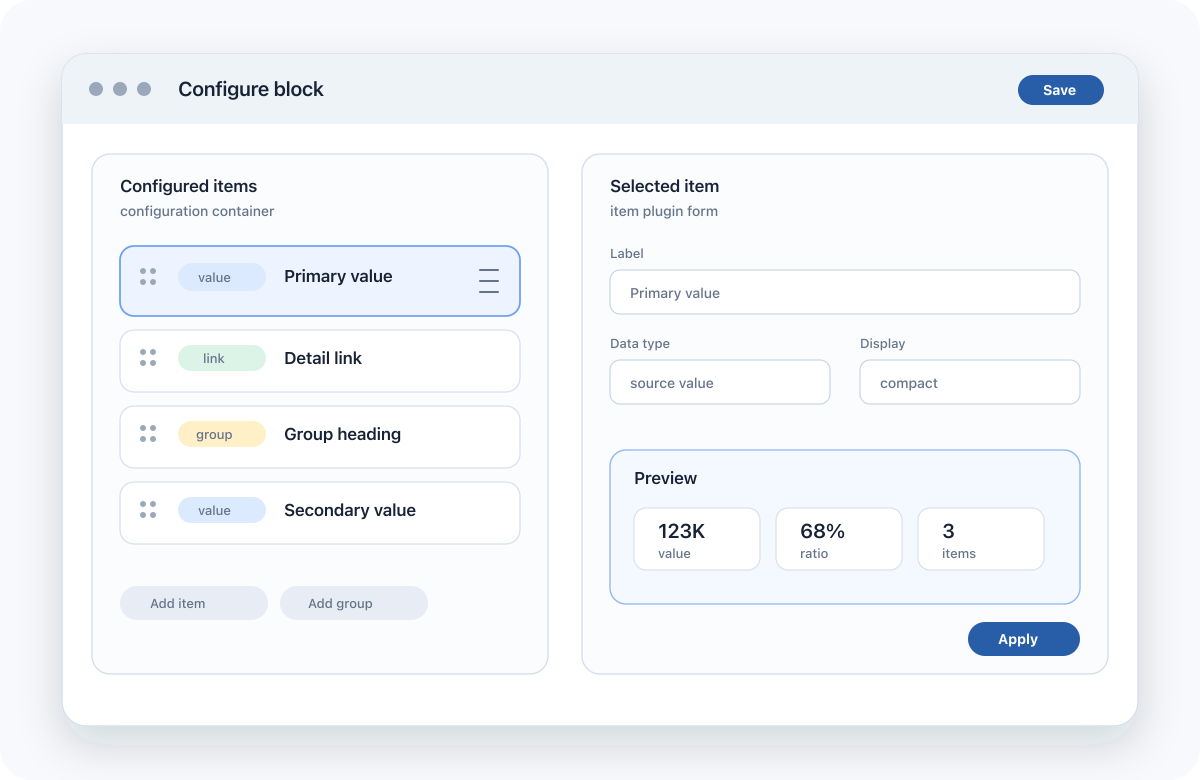
For an individual item type, the plugin class is easier to follow than an array connected to several callbacks. That does not necessarily make the complete implementation simpler.
Did this make the code simpler?
The Drupal 7 ctools plugin files often contained the plugin definition, configuration form, context lookup, data retrieval, rendering and several item callbacks. Some of these files became quite difficult to navigate.
The current block classes usually contain less unrelated code. Configuration items have their own classes, queries are separate plugins, and common block behaviour lives in base classes and traits.
There is not less code everywhere. The shared block base and the configuration container have both grown into substantial pieces of infrastructure. The individual blocks are smaller because they depend on that infrastructure.
The separation has helped with testing. We now have tests for block behaviour, form elements, context handling and access checks. The relevant Drupal 7 modules did not have comparable test coverage.
Conclusion
I am glad we kept the configuration container. Editors already knew it, and it had proved that it could handle the different kinds of configuration our page elements needed.
Implementing its items as plugins allowed us to keep that interface while giving the configuration and rendering code of each item a more obvious place.